
iPad vs iPad Pro: Key Differences Students and Parents Should Know
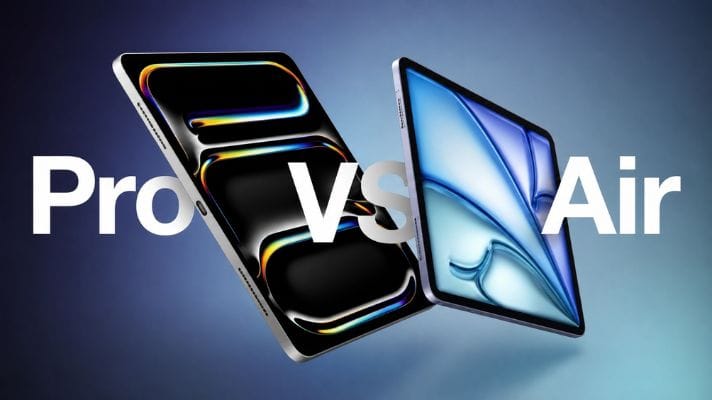
For many students, a tablet or laptop has become part of the everyday study setup with modern education systems.
But choosing the right device can be confusing. An iPad and an iPad Pro may look similar at first glance, yet they are designed for different levels of performance and different types of users.
For students and parents comparing options this school season, the key questions are simple: Which is the best iPad for students? How much performance do you actually need? How important is the display? Will the student take handwritten notes? Is a keyboard necessary? And would a laptop make more sense?
At Chips, students and parents can explore a range of tablets for different study needs, including the iPad 11th Gen, iPad Air, iPad Pro with M5, and Huawei MatePad models. Chips currently lists the M5 iPad Pro in both 11-inch and 13-inch configurations, giving students the choice between greater portability and a larger workspace.
This guide breaks down everything you’ll need to know.
iPad vs iPad Pro: What Is the Main Difference?
The biggest difference between the standard iPad and iPad Pro is performance and display technology.
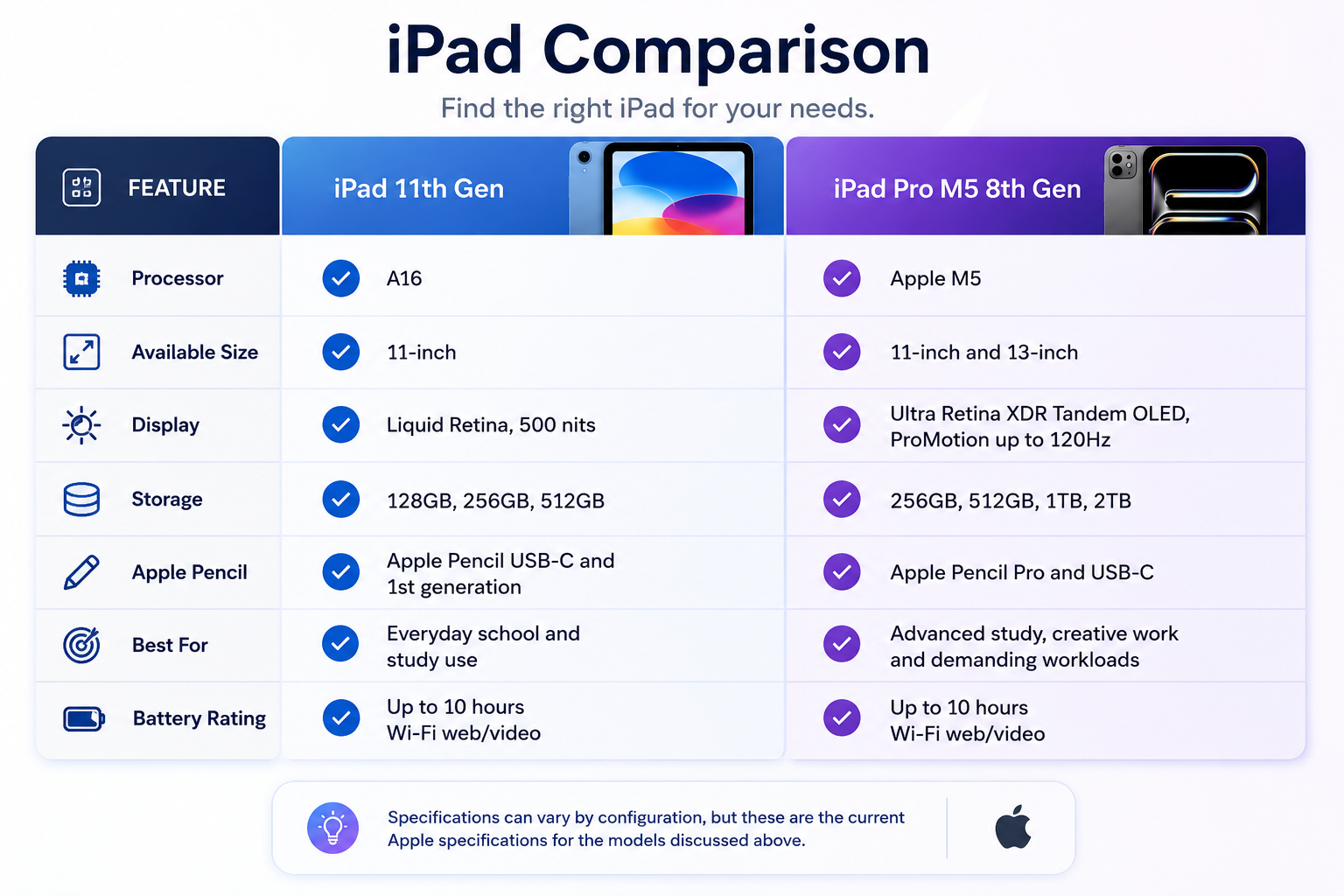
The current iPad 11-inch uses Apple's A16 chip, with a 5-core CPU, 4-core GPU, and 16-core Neural Engine. It starts at 128GB of storage and has an 11-inch Liquid Retina display with a 2360 × 1640 resolution and 500-nit brightness.
The current iPad Pro, meanwhile, uses the M5 chip. The 256GB and 512GB versions have a 9-core CPU, 10-core GPU, 12GB of unified memory, and 153GB/s memory bandwidth. The 1TB and 2TB versions step up to a 10-core CPU and 16GB of unified memory.
For everyday schoolwork, the standard iPad is already capable of handling common tasks such as browsing, reading, note-taking, video calls, document work, presentations, and educational apps.
The iPad Pro can be a better fit for students who need additional performance for demanding workloads such as video editing, graphic design, 3D projects, creative applications, and working with large files. The M5 chip includes a 10-core GPU with hardware-accelerated ray tracing and Neural Accelerators, giving students more performance headroom for advanced creative and computational tasks.
For everyday schoolwork such as browsing, reading, document creation, presentations, video calls, and digital note-taking, however, the standard iPad with A16 already provides the capabilities many students need.
Performance: Does a Student Really Need the iPad Pro?
For most students, the answer is not necessarily.
The A16-powered iPad is more than capable of everyday academic tasks. A student can use it to access online learning platforms, read PDFs, browse research material, write documents, create presentations, attend video calls, watch recorded lessons, and take handwritten notes with a compatible Apple Pencil.
The iPad Pro becomes more relevant when school or university work starts becoming more demanding.
The M5 chip gives the iPad Pro significantly more processing and graphics capability. It also supports hardware-accelerated ray tracing and Neural Accelerators, while the M5 iPad Pro has substantially higher memory bandwidth than the standard iPad.
That additional power can be useful for students studying subjects such as architecture, engineering, design, animation, computer science, film, photography, or other creative disciplines where demanding applications and large files are common.
For a younger student who mainly needs a device for reading, homework, note-taking, and online classes, paying for professional-level performance may not be necessary.
Simple rule: If the device is primarily a digital notebook and study companion, the standard iPad can make a lot of sense. If it also needs to function as a high-performance creative workstation, the iPad Pro is the stronger choice.
Display: Why the iPad Pro Stands Out
The display is one of the most noticeable differences.
The standard iPad has an 11-inch Liquid Retina display with a 2360 × 1640 resolution, 264 pixels per inch, True Tone, and up to 500 nits brightness.
The iPad Pro takes a significant step up with an Ultra Retina XDR Tandem OLED display. Both the 11-inch and 13-inch versions support ProMotion with adaptive refresh rates from 10Hz to 120Hz, P3 wide colour, True Tone, a fully laminated display, and anti-reflective coating. Apple rates the display at up to 1,000 nits SDR brightness and up to 1,600 nits peak brightness for HDR content.
For studying, this can make a difference when students spend long periods reading PDFs, viewing diagrams, reviewing presentations, or working with detailed images.
The 13-inch iPad Pro also provides more physical screen space. That is useful when viewing a textbook beside notes, working with multiple windows, annotating documents, or using a keyboard case.
The 11-inch iPad Pro is easier to carry and is particularly convenient for students who move between classrooms, libraries, homes, and campus spaces.
11-inch vs 13-inch iPad Pro: Which Size Is Better for Students?
The M5 iPad Pro is available in both 11-inch and 13-inch sizes. Chips currently lists both sizes in its iPad range, although individual configurations and availability can change.
Both sizes use Apple's M5 chip and Ultra Retina XDR display technology, support Apple Pencil Pro and Apple Pencil (USB-C), and are available with storage capacities ranging from 256GB to 2TB.
The main practical difference for students is portability versus screen space. The 11-inch Wi-Fi model weighs 444g and is 5.3mm thick, while the 13-inch Wi-Fi model weighs 579g and is 5.1mm thick.
Choose the 11-inch iPad Pro if:
- The student regularly carries the device between classes, home, and the library.
- Portability is a priority.
- Most tasks involve note-taking, reading, research, and everyday productivity.
- The student wants M5 performance in a smaller form factor.
Choose the 13-inch iPad Pro if:
- More screen space is useful for reading textbooks and large PDFs.
- The student frequently works with multiple windows.
- Detailed note-taking, drawing, or document annotation is important.
- Creative applications are a major part of the student's coursework.
- The iPad will frequently be paired with a keyboard for productivity.
For many students, the 11-inch model provides a more portable study setup, while the 13-inch model offers additional workspace for multitasking and visually intensive work.
Apple Pencil: A Game Changer for Digital Notes
Pairing an iPad with a compatible Apple Pencil can turn the tablet into a practical digital notebook for school or university.
The iPad with A16 supports Apple Pencil (USB-C) and Apple Pencil (1st generation). Apple Pencil (USB-C) provides pixel-perfect precision, low latency, and tilt sensitivity, making it useful for handwritten notes, sketches, and document annotation.
The M5 iPad Pro supports Apple Pencil Pro and Apple Pencil (USB-C). Apple Pencil Pro adds features including squeeze, barrel roll, haptic feedback, hover, double-tap, and Find My support. It also pairs, charges, and attaches magnetically to compatible iPad Pro models.
For students, a compatible Apple Pencil can be useful for:
Handwritten notes: Create digital notes without carrying a separate notebook for every subject.
PDF annotation: Highlight passages and add handwritten comments directly to compatible documents and apps.
Diagrams and sketches: Draw charts, equations, scientific diagrams, mind maps, and visual ideas.
Problem-solving: Work through maths and science problems using handwriting rather than relying entirely on a keyboard.
Organisation: Store and organise notes for different subjects digitally, with additional search and organisation features depending on the note-taking app being used.
Apple Pencil compatibility varies by iPad model, so students and parents should always check the exact iPad and Pencil combination before purchasing.
Storage: How Much Does a Student Need?
Storage needs depend on how the device will be used.
The current iPad starts at 128GB and is also available in 256GB and 512GB capacities. The iPad Pro starts at 256GB and goes up to 2TB.
For a student who mainly uses cloud storage, streams lessons, reads documents, and keeps ordinary notes, 128GB can be sufficient.
Students who download large numbers of textbooks, videos, creative files, games, or offline course materials may benefit from 256GB or more.
For creative students working with high-resolution video, photography, design files, or large project libraries, the higher-capacity iPad Pro models can be more appropriate.
A useful approach for parents is to think beyond the first school year. If the device is expected to remain useful through several years of education, choosing more storage at the start may provide more flexibility.
MacBook Neo: When a Laptop Makes More Sense
An iPad works particularly well for touch-based learning, reading, drawing, and handwritten notes, but some students need the traditional keyboard, trackpad, desktop operating system, and workflow of a laptop.
The 13-inch MacBook Neo is another option to consider for a back-to-school setup.
It is powered by Apple's A18 Pro chip, which includes a 6-core CPU, 5-core GPU, 16-core Neural Engine, and 60GB/s memory bandwidth. It comes with 8GB of unified memory and is available with either 256GB or 512GB of SSD storage.
The MacBook Neo has a 13-inch Liquid Retina display with a 2408 × 1506 native resolution, 219 pixels per inch, and 500 nits of brightness.
Battery life is another useful consideration for students who spend much of the day away from a charger. Apple rates the MacBook Neo for up to 16 hours of video streaming and up to 11 hours of wireless web use.
At 1.23kg and 1.27cm thick, it is designed as a compact laptop that can be carried between home, classes, libraries, and study spaces.
Connectivity includes one USB 3 (USB-C) port supporting data speeds of up to 10Gbps, one USB 2 (USB-C) port, and a 3.5mm headphone jack. It also supports Wi-Fi 6E and Bluetooth 6 and includes a 1080p FaceTime HD camera.
For students who spend significant time writing essays, preparing presentations, researching, managing files, or using macOS applications, the MacBook Neo provides a more traditional laptop workflow than an iPad.
iPad or MacBook Neo?
Choose an iPad when handwritten notes, drawing, reading, touch interaction, and tablet portability are priorities.
Choose a MacBook Neo when the student needs extensive typing, macOS, desktop-style workflows, a built-in keyboard and trackpad, or applications better suited to a traditional computer.
Neither is automatically the better student device. The right choice depends on the student's subjects, applications, and preferred way of working.
Huawei MatePad: Another Option for Students
Students looking beyond Apple's ecosystem can also consider Huawei MatePad tablets. Chips currently lists Huawei MatePad devices within its iPads & Tablets category, although individual models, configurations, and accessory bundles may vary according to availability.
One example is the HUAWEI MatePad 11.5 S 2026. It features an 11.5-inch display with a 2800 × 1840 resolution and an adaptive refresh rate of up to 144Hz. Huawei lists configurations with 12GB of RAM and 256GB or 512GB of storage. The tablet weighs approximately 515g and measures 6.1mm thick.
Huawei also positions the MatePad 11.5 S 2026 for productivity and note-taking, with support for HUAWEI Notes, the HUAWEI M-Pencil Pro, and a detachable keyboard. Accessory availability and what is included in the box can vary by market, retailer, and product configuration, so students and parents should check the individual Chips product listing before purchasing.
A Huawei MatePad can therefore be worth considering for students who want a high-resolution tablet display, digital note-taking capabilities, and optional keyboard functionality outside the Apple ecosystem.
Don't Forget the iPad Accessories
The tablet itself is only part of a useful back-to-school setup.
1. Protective Case
A case is one of the first accessories parents should consider. Students carry devices between classrooms, homes, libraries, and bags, so protection matters.
Look for a case with adequate edge and back protection, a secure fit, and a stand position that works comfortably for reading or typing.
2. Apple Pencil
For students who take handwritten notes, an Apple Pencil can completely change how an iPad is used.
Before purchasing, check the exact iPad model and choose a compatible Pencil. The current iPad supports Apple Pencil USB-C and 1st generation, while the M5 iPad Pro supports Apple Pencil Pro and USB-C.
3. Keyboard or Keyboard Case
A keyboard becomes particularly useful for essays, research assignments, presentations, emails, and long-form typing.
A keyboard case can also make an iPad feel more like a compact laptop while allowing students to remove it when they want a tablet-only setup.
4. Screen Protector
A screen protector adds another layer of protection against scratches and everyday wear. For students using a stylus, it is worth choosing one designed to work comfortably with touch and Pencil input.
How to Choose the Right Back-to-School Device
There is no single device that is best for every student. Instead, the decision should start with the student's subjects, study habits, applications, and everyday workload.
For everyday schoolwork: The iPad with A16 is a practical option for browsing, reading, educational apps, documents, video calls, presentations, and digital note-taking with a compatible Apple Pencil.
For demanding and creative workloads: The M5 iPad Pro provides a more powerful chip, an Ultra Retina XDR Tandem OLED display, and Apple Pencil Pro support, making it worth considering for students whose coursework involves demanding creative applications or intensive multitasking.
For portability: The 11-inch iPad Pro combines M5 performance with a smaller, lighter form factor than the 13-inch model.
For more screen space: The 13-inch iPad Pro provides additional workspace for large PDFs, multitasking, detailed notes, drawing, and creative applications.
For traditional laptop productivity: The MacBook Neo provides macOS, a built-in keyboard and trackpad, up to 16 hours of video-streaming battery life, and a conventional laptop workflow.
For an alternative tablet ecosystem: Huawei MatePad models provide another option for digital note-taking, reading, multimedia, and productivity, with features and accessory support varying by model.
The best back-to-school device is not necessarily the one with the highest specifications. It is the one that fits the student's actual workload and how they prefer to study.
Build Your Back-to-School Setup with Chips
A good study device should make schoolwork easier, not more complicated.
Whether you need a straightforward iPad for everyday learning, an iPad Pro for demanding creative work, a MacBook Neo for laptop-based productivity, or a Huawei MatePad for note-taking and multimedia, the goal is to build a setup around the student's needs.
Chips offers a wide selection of iPads, tablets, MacBooks, and accessories through its online store, backed by more than 13 retail branches across Kuwait. Explore the current iPads & Tablets collection at Chips to compare the devices currently available.
For students heading back to school, the best technology investment isn't necessarily the most powerful one. It's the one that fits the student's subjects, study habits, workload, and everyday routine.
Frequently Asked Questions
Is the iPad Pro better than the iPad for students?
The iPad Pro is more powerful, but that does not automatically make it better for every student. The standard iPad is sufficient for many common school tasks, including browsing, reading, note-taking, video calls, documents, and educational apps. The iPad Pro is better suited to demanding creative work, advanced multitasking, and students who want a premium display and higher performance.
What is the main difference between iPad and iPad Pro?
The biggest differences are the processor, display, storage options, and Apple Pencil support. The current iPad uses the A16 chip and a Liquid Retina display, while the iPad Pro uses the M5 chip and an Ultra Retina XDR Tandem OLED display with ProMotion up to 120Hz.
Is the 11-inch or 13-inch iPad Pro better for students?
The 11-inch iPad Pro is easier to carry and works well for everyday note-taking and study. The 13-inch version provides more screen space for PDFs, split-screen work, detailed notes, and creative applications. The better size depends on whether portability or workspace is more important.
Is Apple Pencil Pro compatible with the iPad Pro M5?
Yes. Apple Pencil Pro is compatible with both the 11-inch and 13-inch iPad Pro with M5. Apple also lists Apple Pencil USB-C as compatible with these models.
Which Apple Pencil is best for taking notes?
Apple Pencil USB-C is suitable for precise writing, note-taking, and document annotation. Apple Pencil Pro adds advanced features such as squeeze, haptic feedback, barrel roll, hover, and Find My, making it the more feature-rich option for compatible iPad models.
How much iPad storage does a student need?
For basic schoolwork, 128GB can be enough when much of the student's content is stored in the cloud. Students who download lots of videos, textbooks, applications, or creative files may benefit from 256GB or more. The iPad Pro offers up to 2TB, which is useful for students with large professional or creative files.
Is an iPad good for handwritten school notes?
Yes. With a compatible Apple Pencil, students can write directly on the screen, annotate PDFs, create diagrams, solve equations, and organise digital notebooks. The iPad Pro additionally supports Apple Pencil Pro and its advanced input features.
Is an iPad better than a MacBook for students?
It depends on the student's work. An iPad is better suited to handwritten notes, reading, drawing, touch-based learning, and portability. A MacBook is generally better for long-form typing, desktop-style multitasking, and workflows that require a traditional laptop.
Is the MacBook Neo good for students?
The MacBook Neo can be a practical option for students who prefer a traditional laptop. It has a 13-inch Liquid Retina display, Apple's A18 Pro chip, 8GB of unified memory, and either 256GB or 512GB of SSD storage. Apple rates its battery for up to 16 hours of video streaming or 11 hours of wireless web use. At 1.23kg, it is also relatively easy to carry between classes and study locations. Whether it is the right choice depends on the software, storage, and performance requirements of the student's coursework.
Are Huawei MatePad tablets good for studying?
Huawei MatePad tablets can be useful for students who want a tablet for reading, digital note-taking, multimedia, and everyday productivity. For example, the HUAWEI MatePad 11.5 S 2026 has an 11.5-inch 2800 × 1840 display with an adaptive refresh rate of up to 144Hz, 12GB of RAM, and 256GB or 512GB of storage. It also supports productivity accessories such as the HUAWEI M-Pencil Pro and detachable keyboard. Accessory availability and bundles can vary, so check the individual product configuration before buying.
What accessories should students buy with an iPad?
The most useful accessories are a protective case, a compatible Apple Pencil, a keyboard or keyboard case, and a screen protector. The exact accessories should be selected according to the iPad model and the student's study habits.
Can an iPad replace a laptop for school?
For some students, yes. An iPad with a keyboard can handle many school tasks, including documents, presentations, browsing, email, video calls, and research. However, students who rely heavily on desktop applications, extensive typing, or complex workflows may be better served by a MacBook Neo or another laptop.
What should parents consider before buying a study tablet?
Parents should consider the student's age, subjects, typical workload, note-taking habits, storage needs, portability, accessory requirements, and how long they expect the device to be used. Comparing the complete setup (including the tablet, Pencil, keyboard, case, and screen protection) is more useful than comparing the tablet price or specifications alone.